Panel Designer: How It Works End to End
A designed panel is a panel built in the Panel Designer instead of in code. You design it once and register it as a panel type, e.g. espnStatsFootball. Every website and TV app that shows that panel type then draws it from the same saved file, with live data. Changing it needs no app release and no edits to each channel.
At a glance
There are four layers, and the panel type ties them together. The designer saves the panel type. Each save writes a new file. Each page's settings point at the newest file. Websites and apps draw the panel from that file.
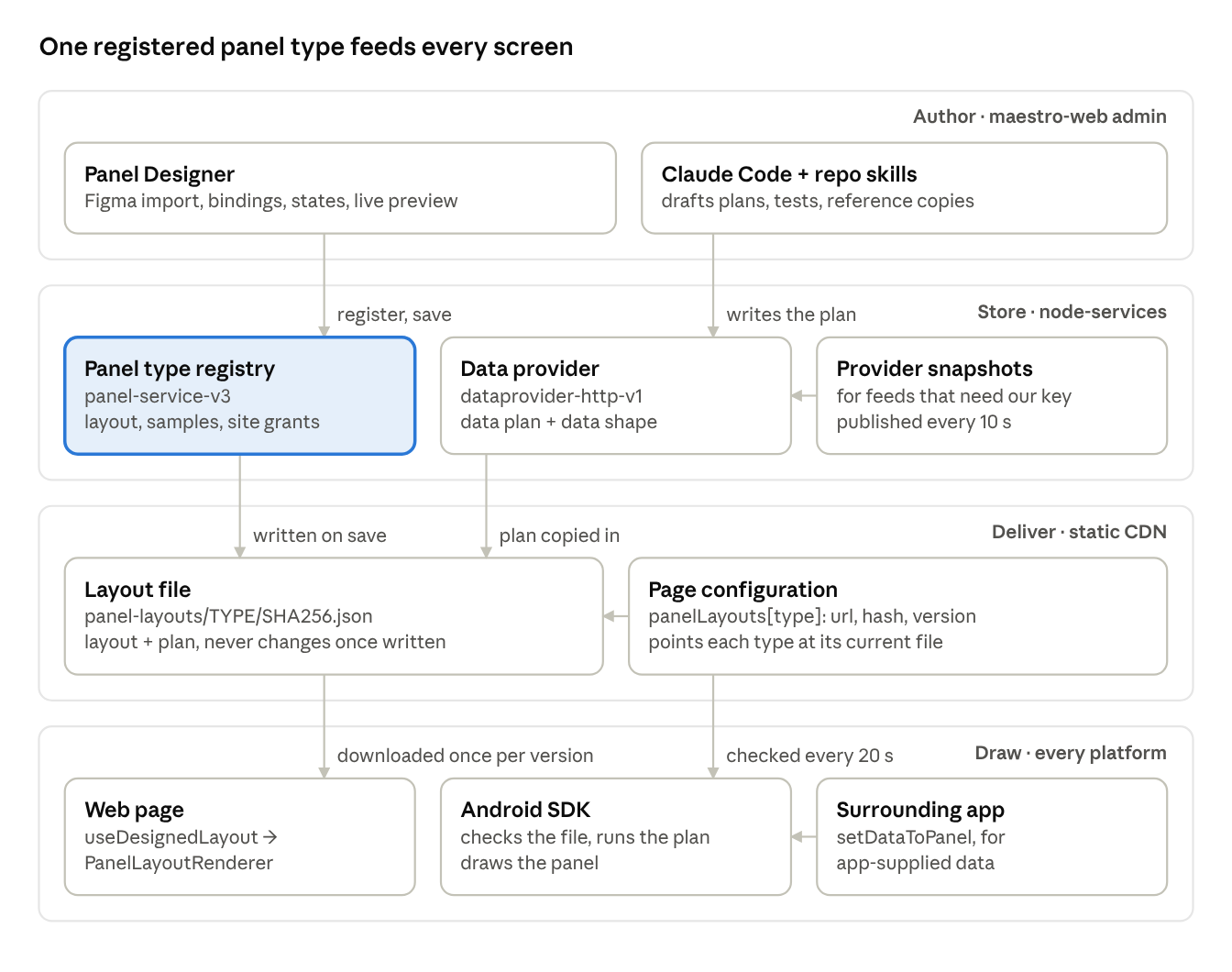
Websites and TV apps both read the page's settings first, then download the file those settings point to. The file holds the panel's design and its data plan, the instructions for getting live data, so the app needs nothing else. Some panels get their data from the surrounding app instead, e.g. espnKeyPlays-pd; those don't use a plan.
The vocabulary
These terms are used throughout. The examples are real panels, to make each idea concrete; they are not the only cases.
| Term | In plain words | Example |
|---|---|---|
| Panel type | A kind of panel that channels can switch on. A designed panel is a panel type that has a layout. It is stored once for everyone; channels don't keep their own copy. Stored in node-services (panel-service-v3). | e.g. espnStatsFootball, foxStatsFootball |
| Layout | The panel's design, saved as JSON: boxes, text, pictures, lists, states such as pre-game and live, and what the TV remote can select. It has a version number (now 1.3); older apps skip the parts they don't understand. | e.g. the shop sheet in espnShop-pd |
| Data provider | A source of partner data that a site is allowed to use, set up in node-services. | e.g. ESPN's game feed behind espnStatsFootball |
| Data plan | Instructions saved on the data provider: which URLs to call, how often, and how to reshape the replies into panel data. It never contains passwords or keys. In code it is called a fetch plan. | e.g. appleMusic reads latest.json, then the file it points to |
Panel type ids follow one pattern: provider, then panel, then sport, e.g. espnStatsFootball. Don't put "Panel" in an id or end it with a number. When the designer remakes a panel that already exists in code, its id ends in -pd (for Panel Designer), e.g. foxTopics-pd, until the designed one replaces the coded one.
Where a panel's data comes from
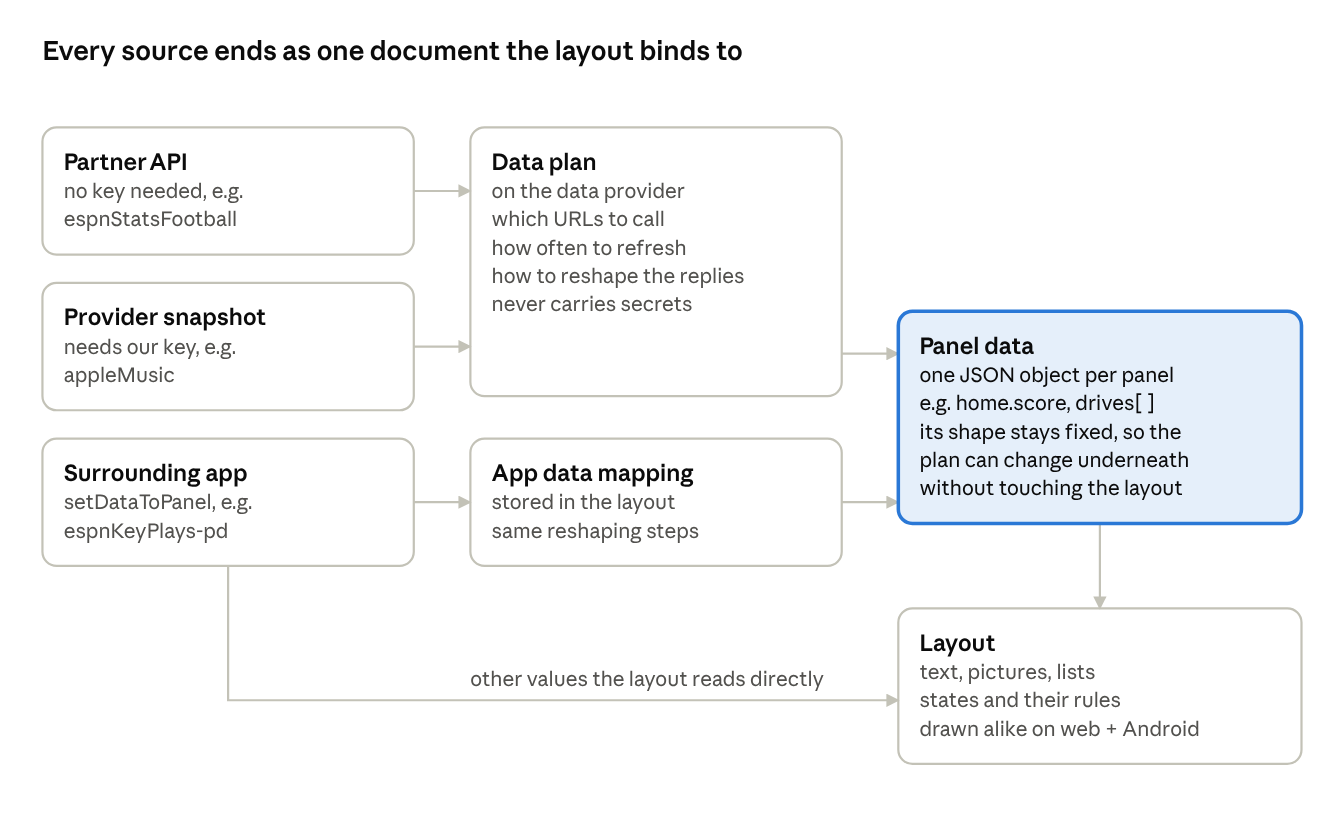
Panels never read a partner's reply directly. Whatever the source, the data is first reshaped into one JSON object, the panel data, and the layout only reads from that. So the plan can change, e.g. when a partner changes its API, without anyone redesigning the panel.
| Term | In plain words | Example |
|---|---|---|
| Panel data | The single JSON object the layout reads its values from, after the plan has reshaped the partner's reply. Its shape stays the same, so the plan can change without redesigning the panel. In code it is called the document. | e.g. home.score and the drives list in espnStatsFootball |
| App-supplied data | Data the surrounding app hands to the panel with setDataToPanel, instead of a data provider. In code it is called host data. | e.g. espnKeyPlays-pd: the ESPN app sends the key plays and which clip is playing |
| Samples | Saved example payloads from the app, plus pretend replies, for previewing app-supplied panels in the designer. Stored on the panel type; apps never download them. | e.g. the key plays samples on espnKeyPlays-pd |
| Provider snapshot | For partners whose API needs our key: our servers fetch the data and publish it as public files every 10 seconds. The plan reads those files instead of calling the partner. | e.g. appleMusic, and Stats Perform football |
Partner APIs and snapshots are read by the data plan. App-supplied data goes through a simpler mapping stored in the layout. App-supplied data works in the web designer today; Android support is still to do (see docs/core/panellayout/PLAN.md in the SDK repo).
What a device does at runtime
The page's settings are small and checked often. The layout file is downloaded once per version. This is what the Android SDK does to show e.g. espnStatsFootball.
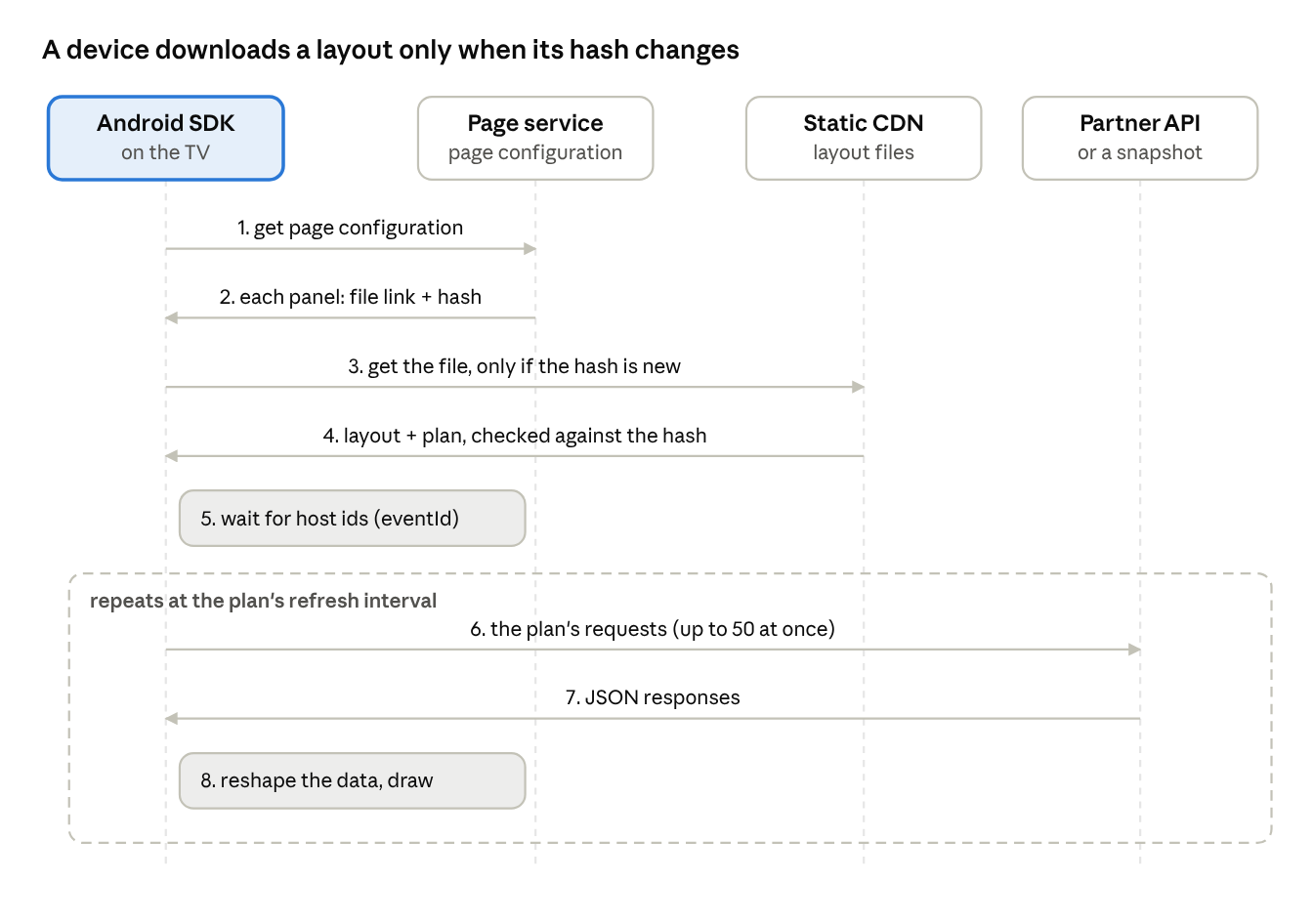
- Steps 1–2 repeat every 20 seconds while the panel is on screen, for up to 2 hours; checking pauses after 10 minutes off screen. Each save gives the panel's file a new hash, a fingerprint of its contents. A new hash in step 2 is how your change reaches the TV.
- Steps 3–4: the app checks the downloaded file against the hash and rejects it if they don't match. It keeps the last good file for each panel type.
- Steps 5–8: the plan waits until the app has passed in the ids it needs, such as the game's
eventId. It then refreshes at the plan's interval, and keeps showing the last good data if a request fails.
Websites do steps 1–4, with page settings cached for 60 seconds. Websites don't run data plans yet, so on the web, live data only appears in the designer's preview.
Build your own panel
A feature lead can go from a Figma frame to a live panel in about a day, without an app release. Most of the work happens in the designer; only the data plan needs JSON.
Before you start
- A super-admin account on a site with the
panelDesignerfeature. Super-admin rights are given per site. - The Figma frame, and a Figma personal access token for importing it.
- An answer to "where does the data come from?" Use the table below.
| Data source | Use it when | What you need | Example |
|---|---|---|---|
| A data provider with a plan | The partner's API works without our key | The provider added to your site's plan. Ask the backend team if it's missing from the designer's list. | e.g. espnStatsFootball, foxStatsFootball |
| App-supplied data | The app around the panel already has the data | Agree the setDataToPanel keys with the app team, and save an example payload. | e.g. espnKeyPlays-pd |
| A provider snapshot | The partner's API needs our key | Backend work in node-services to fetch and publish snapshots. Plan time for it. | e.g. appleMusic |
Steps
- Open the designer. On the site, open a channel, then the Panels sheet, then Panel Designer. Start from one of the site's panels, a blank panel, or a Figma design. (If the site has no registered panels yet, the list is empty, and delivered panels, e.g.
appleMusic, are waiting to be registered.) - Import the design. Choose From a Figma design, paste the frame link and your Figma token, and press Import. Text, pictures and auto-layout come across. Pictures are copied to our media library when you save, because Figma's own picture links expire. Tip: name a text layer
{{home.score}}in Figma and it arrives already linked to data. - Find your way around. Layers are on the left. The middle shows the panel at each screen size (web, mobile, TV). On the right, Inspect edits the selected layer, Data chooses the data, and JSON shows the saved layout. With the whole panel selected, Inspect shows its catalog card (name, id, icon) and Available on.
- Connect it to data. Select a text layer. Under Text, use Insert a fact… to link it to a value from the panel data, e.g.
{{artist.name}}inappleMusicor{{home.score}}inespnStatsFootball. Turn repeated rows into a list, e.g. thedriveslist inespnStatsFootball. The same panel offers Focusable (what the TV remote can select) and Sticky header. - Preview with real data. In the Data tab, pick the data provider, then Live feed, Built-in sample or Pasted JSON. The list of facts shows every value the layout can use. For app-supplied panels, e.g.
espnKeyPlays-pd, Simulate the host plays the samples and pretends to be the app. - Add behaviour. States such as pre-game, live and final, each with a rule for when it shows (the State menu in the bottom toolbar). Sheets that open over the panel when a row is pressed, e.g. in
espnShop-pd. Rive animations, where Figma can't describe the motion (Replace with a Rive file). - Fill in the catalog card and register. Name, id (see the naming pattern above), icon, description, and Available on (chosen sites or any site). Press Register panel. The site you're on gets access.
- Switch it on in a channel. The new panel type appears in the Panels sheet next to the coded ones. Switch it on and publish.
- Check it on a device. The website shows it at once. Android picks up the new file within about 20 seconds while the panel is on screen, or on restart. The demo app on the TV emulator is the quickest check.
- Make changes. Open the panel from "This site's panels" and press Save. Every channel and app that shows the panel type moves to the new version; there's no per-channel copy to update.
The one step that isn't point-and-click is the data plan. It is JSON saved on the data provider, and changing it needs the provider's secret, so today the backend team applies it. The plan language is small, and the designer's preview runs it, so mistakes show up straight away. With Claude, a saved partner reply and a description of the panel data you want are usually enough to get a working plan and a test.
Keep a reference copy in the repo. Each delivered panel also lives in client/src/features/panel-designer/model/<customer>/ and docs/panel-layout/<panel>/, e.g. docs/panel-layout/espn-nfl-stats/ for espnStatsFootball. The copy holds the layout, the plan, a sample reply, and a test that checks every value the layout uses is in the sample. It lets the SDK teams, and whoever comes next, reproduce the panel.
Working with Claude
Claude Code already knows how this system works. Each repo has skill files: notes for Claude that load by themselves when you mention panels, layouts or plans. You don't need to explain the system; describe the panel you want and share the data you have.
| Repo | Skill | Covers |
|---|---|---|
maestro-web | .claude/skills/client/panel-designer/ | The layout format, the designer, the panel type registry, data plans, host data, and a step-by-step playbook |
maestro-android-sdk | .claude/skills/panel-layout/ | The Android renderer, how layout files and plans are loaded, tests, running the TV emulator |
node-services | .claude/skills/http-services/panel-types.md | The registry API, data providers and their plans, layout file writing, provider snapshots |
Example prompts
These follow the order we built real panels in. Replace the parts in angle brackets.
- Start. "I want to build a panel for
<provider>that shows<what>, e.g. live drive stats likeespnStatsFootball. Here's the Figma frame<link>and a sample partner reply<file or URL>. Suggest the panel data the layout should read from." - Map the data. "Write a data plan that turns this reply into that panel data. Add a test that runs the plan on the saved reply and checks that every value the layout uses is there."
- Handle a feed that needs our key. "The partner's API needs our key, so the TV can't call it directly. What do we need for a provider snapshot, as we did for e.g.
appleMusic?" - Preview. "Start the dev server and open the designer on
<site>so I can check the panel with live data." - Fix the design. "In the preview, the score row wraps at 360 px wide and the logos are blurry. Compare it with the Figma frame and fix it."
- Save a reference copy. "Add a reference copy of this panel under
model/<customer>/anddocs/panel-layout/<panel>/, with the test." - Check a device. "Run the TV emulator with the demo app for the ESPN client and show me the panel's tab."
- Debug. "The panel is blank on Android but fine in the designer. Check the page settings, the layout file and its plan, and the device logs."
- Find gaps. "The designer can't do
<X>, e.g. a countdown clock. What would it take to add it to the layout format and to both the website and Android?"
Habits that work. Give Claude real data (a saved partner response), not a description of it. Ask for a test with every plan. Check each change in the designer and on the emulator before registering. Keep keys in files and tell Claude the file path; never paste a key, token or password into the chat.
Expect platform work along the way
Most panels need only the designer and a plan. But a new kind of visual, data operation or behaviour means a change to the platform itself, and usually in more than one repo:
| Repo | Typical change | Example |
|---|---|---|
maestro-web | The layout format, how the website draws it, the designer screens, a new data operation | e.g. sheets for espnShop-pd, picture sizing for appleMusic |
maestro-android-sdk | The same feature on Android, so TVs match the website | e.g. the multi-request plans and picture sizing for appleMusic |
node-services | Panel type fields, plan checks, snapshots for a feed that needs our key | e.g. snapshots for appleMusic |
These changes keep web and every SDK drawing the same panel, so they need review from someone who knows all three. Talk to Ari Evans before starting one, until a permanent owner is named.
Where the code lives
The work spans three repos. On the web side it is a stack of pull requests, each built on the one before.
| Part | Repo | Path |
|---|---|---|
| Layout format (types, spec, schema) | maestro-web | client/src/models/IPanelLayout.ts, docs/panel-layout/spec.md |
| Designer screens | maestro-web | client/src/features/panel-designer/ui/designer/ |
| Web renderer | maestro-web | client/src/features/panel-designer/ui/renderer/PanelLayoutRenderer.tsx |
| Plan runner and data logic | maestro-web | client/src/features/panel-designer/model/ (fetch-plan.ts, resolve.ts, host-data.ts) |
| Delivered panels (reference copies) | maestro-web | model/<customer>/, docs/panel-layout/<panel>/, e.g. espn-nfl-stats, espn-shop, fox-topics |
| Registry client | maestro-web | client/src/features/page-builder/model/panel-types/ |
| Registry API | node-services | packages/http-services/panel-service-v3/src/routes/PanelType.ts |
| Panel type model, plan checks, site grants | node-services | packages/legacy-core/ (interfaces/IPanelType.ts, assertions/assertValidFetchPlan.ts, utils/panelTypeGrants.ts) |
| Layout file writer | node-services | packages/rpc-services/maestro-json-page-renderer-rpc-v1/src/panelTypeFiles.ts |
Page configuration (panelLayouts) | node-services | packages/http-services/page-service-v2/src/routes/configuration.ts |
| Data providers | node-services | packages/http-services/dataprovider-http-v1/ |
| Provider snapshots | node-services | packages/rpc-services/provider-snapshot-worker-v1/ |
| Android: loading, plans, layout logic | maestro-android-sdk | shared/src/commonMain/.../feature/panellayout/ (PanelLayoutFiles, plan/PanelPlanRunner.kt) |
| Android: drawing | maestro-android-sdk | uitoolkit/.../panellayout/ |
| Android: shared test data | maestro-android-sdk | panel-layout-samples/ (bundles, fixtures, plan expectations from web) |
| Android: design notes | maestro-android-sdk | docs/core/panellayout/RENDERER.md, PLAN.md |
Pull requests in flight.
- maestro-web: #7490 (designer and panel types, format 1.0) → #7499 (Rive, 1.1) → #7505 (sheets, 1.2) → #7510 (app-supplied data, 1.3) → #7511 (simulate the host) →
panel-apple-music. - maestro-android-sdk: #1102 (layout files) and #1105 (data plans) are merged into the SDK's panel layout branch; #1110 (multi-request plans, picture sizing) is open.
- node-services: choosing which sites see a panel type is on
NS-11722-panel-type-sites, not yet merged.
Gotchas and troubleshooting
Most problems so far have been one of these.
| Symptom | Cause | Fix |
|---|---|---|
| A site's whole panel list fails to load (error 500) | A panel type points at a data provider id that doesn't exist, e.g. a designer sample id starting fixture: | Only save real provider ids (24 characters). To repair, use PUT /types/:id to set dataProviderId: null, sending type, name and supportedPlatforms with it. |
| The panel is blank on Android but fine in the designer | The panel type has no data provider, so its file has no data plan, e.g. espnShop-pd | Connect a provider that has a plan, or use app-supplied data. |
| The TV still shows the old version | The app hasn't checked the page settings since you saved | Wait about 20 seconds with the panel on screen, or restart the app. Check that the panel's hash changed in the page settings. |
| A provider appears in the designer but the preview is empty | The panel type hasn't been saved with that provider yet, or the provider isn't in the site's plan | Save the panel type with the provider. Ask the backend team to add the provider to the site's plan. |
| Deleting a panel type fails (error 409) | A channel still has a panel of that type, even one switched off | Remove the panel from the channel first, or rename the type and point the channel's panel at the new id. |
| Registering showed an error, but the panel type exists | The server saved it, then failed while replying | Check the list before registering again. |
| The second update to a data provider is refused | Each update gives the provider a new secret | Whoever updates the provider must keep the new secret it returns. |
Album art has white edges, e.g. in appleMusic | The requested picture size didn't match the art's shape | Picture sizes are rounded up in steps of 8 px. Keep picture boxes the same shape as the art. |
| A Tailwind class has no effect in the designer screens | Older global CSS overrides it | Add an override in client/src/styles/tailwind.css, then check the browser's computed styles. |
Pushing to a lessthan3 repo fails with "Internal Server Error" | A GitHub hiccup | Try again in a few minutes. |
Data plans never contain keys. A command that uses a key, token or database password must never print it. That includes warnings and error messages, not just normal output; this has happened. Before running anything that reads a secret, check that its whole output is clean. Prefer the panel type API, with the key read from a file, over changing the database directly.
Ownership and open work
The system needs one owner across the three repos. Most of the job is keeping the layout format, the website and the apps in step, so a panel looks and behaves the same everywhere.
What the owner takes on
- The layout format: its version number, the spec, the schema and the shared test layouts.
- Keeping platforms in step: the website is the reference, Android is checked against it, and an iOS version would be too.
- The data plan language: a new operation is added to the website, Android and the server's checks at the same time.
- The panel type list: ids follow the naming pattern,
-pdversions are retired once they replace the coded panel, and test panel types are cleaned up. - Onboarding feature leads: this doc, the Claude skills, and reviewing each lead's first panel.
Open work
The quickest way to grow owners is pairing: a feature lead builds one real panel with the owner, using Claude and the skills above, then builds the next one alone. Until an owner is named, talk to Ari Evans.
- Merge the open pull requests: maestro-web #7490 → #7499 → #7505 → #7510 → #7511 →
panel-apple-music, maestro-android-sdk #1110, and the node-services site-choice branch. - Websites don't run data plans yet; on the web, live data only appears in the designer preview.
- App-supplied data on Android, e.g. for
espnKeyPlays-pd. - Stats Perform football: write the snapshot plan.
- Only super-admins can register panels. Letting site admins do it comes later.
- Changing a data plan needs the provider's secret, so feature leads depend on the backend team. A plan editor in the designer would fix that.
- The server checks a layout's basic structure, not the full schema. Share the schema between repos.
- Open question: who builds the iOS version, and when.