What Just Happened
This page covers the module that pops up over the video. For the panel that lists every recap, see the What Just Happened panel.
Overview
The What Just Happened module tells viewers when a key moment has just happened in a live event. It pops up over the video with a short, AI-generated recap, and links to the What Just Happened panel, where the viewer can read every recap so far.
The module has two states:
- Preview: a compact pill that reads "What Just Happened?". Pressing it expands the module.
- Active: an expanded bar that shows the recap with Dismiss and Explore More buttons. It dismisses itself after a set time.
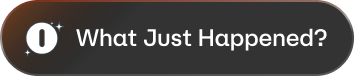
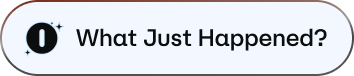

The SDK decides when the module appears. Your application hosts it:
- The host renders
WhatJustHappenedButtonover its video, reports the playhead, hands focus back and forth, and opens the panel when the viewer picks Explore More. - The SDK fetches the recaps, picks which one to show and when, and shows, focuses and auto-dismisses the module.
WhatJustHappenedButton is a React component exported from @maestro_io/maestro-web-sdk. The module is coupled to the
whatJustHappened panel type (MaestroPanelType.WHAT_JUST_HAPPENED).
The module renders on all platforms, including desktop_web. On desktop web it shows a mouse-driven pill that scales
with the window width; on TV platforms it shows the D-pad-navigable pill. On every platform you position it: place
the component wherever you want it to appear inside the player.
How the host and the module interact
- Render the module. Mount
WhatJustHappenedButtononce, inside your player element, as soon as playback starts. It renders nothing until there is a recap to show. You can mount it before the session starts: it attaches on its own onceuserDidStartWatchingEventresolves, and follows the viewer to a new event when they switch. - Report the playhead. Call
updatePlayerTimeCodewith the playhead as epoch milliseconds. Recaps dated after the playhead are never shown. - Decide whether it may appear. Answer
onAppearwithcanAppearandcanFocus. - Share focus. Pause your own focus handling on
onFocusRequested, take over ononNavigateOut, and give focus back withstartFocusManagement. - Open the panel. On
onEngage, show the panel and switch to What Just Happened. - Control it from player state. Send
dismissModulewhen an ad break starts or your own player UI opens, andtriggerModuleto show the latest recap on demand.
Rendering the module
import { WhatJustHappenedButton } from "@maestro_io/maestro-web-sdk";

<WhatJustHappenedButton
  onEngage={handleEngage}
  onDismiss={handleDismiss}
  onAppear={handleAppear}
  onFocusRequested={handleFocusRequested}
  onFocusReleased={handleFocusReleased}
  onNavigateOut={handleNavigateOut}
/>;
| Prop | Type | Description |
|---|---|---|
onEngage | (note: WjhNote \| null) => void | Required. The viewer picked Explore More. Open the panel here. |
onDismiss | (note: WjhNote \| null) => void | Required. The module went away: the viewer picked Dismiss or pressed Back, the auto-dismiss timer ran out, or the viewer picked Explore More (called just before onEngage). |
onAppear | (note: WjhNote) => WjhAppearResponse | Optional. Called before the module appears. See onAppear. Without it, the module always appears and takes focus. |
onFocusRequested | () => void | Optional. The module appeared and took focus. Pause your own focus handling. TV only: never called on desktop_web. |
onFocusReleased | () => void | Optional. The module went away and gave focus back to your application. TV only: never called on desktop_web. |
onNavigateOut | (direction: 'up' \| 'down' \| 'left' \| 'right') => void | Optional. The viewer arrowed out of the module. Move focus to the right element in your application. The module stays on screen. TV only: never called on desktop_web. |
focused | boolean | Optional. Set by the host for its own styling: whether the module's container is the focused element. |
onAppear
Called before each appearance, with the recap about to be shown. Return whether it may appear, and whether it may take focus.
type WjhAppearResponse = {
  canAppear: boolean;
  canFocus: boolean;
};
| Field | Type | Description |
|---|---|---|
canAppear | boolean | false keeps the module hidden for this recap. It does not start the cooldown, and no module_view is sent. |
canFocus | boolean | false shows the module without taking focus. onFocusRequested is not called. |
While the panel drawer is open, return { canAppear: true, canFocus: false }. The pill still appears at the bottom of
the screen, but focus stays inside the panel.
WjhNote
The recap the module is showing. Passed to onAppear, onEngage and onDismiss.
type WjhNote = {
  id: string;
  timeLabel: string | null;
  text: string;
  interestingness: number | null;
  confidence: number | null;
};
| Field | Type | Description |
|---|---|---|
id | string | The recap's ID. |
timeLabel | string \| null | The time label shown with the recap, as provided by the feed. null when not set. |
text | string | The recap text. |
interestingness | number \| null | As provided by the feed. null when not set. |
confidence | number \| null | As provided by the feed. null when not set. |
Sending data to the module
Control the module with
setDataToPanel under the whatJustHappened key.
type WhatJustHappenedPanelData = {
  triggerModule?: boolean;
  dismissModule?: boolean;
};
| Field | Type | Description |
|---|---|---|
triggerModule | boolean | Optional. When true, shows the module with the newest recap at the playhead, even if it is not a key moment. Does nothing until the required time in session has passed. |
dismissModule | boolean | Optional. When true, takes the module down. The recap it was showing does not pop up again. Later recaps still appear as usual. Does nothing when the module is not showing. |
If one payload sets both fields, dismissModule wins and the module stays down. A field that is missing or false
does nothing.
// Show the latest recap on demand
eventViewModel.setDataToPanel({
  whatJustHappened: { triggerModule: true },
});

// Take the module down, for example when an ad break starts
eventViewModel.setDataToPanel({
  whatJustHappened: { dismissModule: true },
});
Required time in session
The module cannot appear until the viewer has been in the session for a set time: 50 seconds by default,
configurable with required_time_in_session (see Client settings). This applies to both automatic
appearances and triggerModule. A triggerModule sent earlier is ignored. It is not queued.
Analytics
The module sends these events through your delegate's
trackImpression and
trackAction.
| Name | Sent through | When | Fields |
|---|---|---|---|
module_view | trackImpression | Once each time the module appears. | e0_kingdom: 'module', e1_phylum: 'view', e2_class: the module's name, e3_order: null, e4_family: null, metadata: see below. |
module_engage | trackAction | The viewer picks Explore More. | e0_kingdom: 'module', e1_phylum: 'engage', e2_class: the module's name, e3_order: null, e4_family: null, metadata: see below. |
module_dismiss | trackAction | The viewer picks Dismiss, presses Back, or the auto-dismiss timer runs out. | e0_kingdom: 'module', e1_phylum: 'dismiss', e2_class: the module's name, e3_order: null, e4_family: null, metadata: see below. |
Every event carries this metadata:
{
  visibility_duration_timer: number | null; // the module's visibility_duration_timer setting
  display_text: string; // the module's display text
}
module_dismiss is not sent when you take the module down with dismissModule, or when onAppear returns
canAppear: false.
In a multi-event session, each event is sent once for every event in the session, each time with that event's own payload.
Client settings
These settings live on the module's configuration on maestro.io, linked to the What Just Happened panel.
| Setting | Type | Default | Description |
|---|---|---|---|
required_time_in_session | number | 50 | How long the viewer must be in the session before the module can appear, in seconds. 0 turns the wait off. When not set, the panel's setting of the same name is used. |
visibility_cooldown_timer | number | 600 | The minimum time between two appearances, in seconds. 0 turns the cooldown off. |
visibility_duration_timer | number | 10 | How long the expanded bar stays up before it dismisses itself, in seconds. When not set, the bar uses 10 seconds and analytics report null. |
The module only appears when the What Just Happened panel is on the page and enabled, because Explore More opens it. The recaps come from the panel's feed, so the panel's settings (such as how often it polls) apply to the module too. See the panel's client settings.
Behavior notes
- It runs without the panel. The SDK starts fetching recaps when the session starts, so the module can appear for viewers who never open the panel.
- Which recap it shows. The module appears on its own only when the newest recap at the playhead is marked as a
key moment.
triggerModuleshows the newest recap whether or not it is a key moment. - Recaps already read don't pop up. Recaps the viewer has seen in the open panel never appear in the module afterwards.
- The playhead.
updatePlayerTimeCodemust receive epoch milliseconds, not seconds since the start of the stream. Values earlier than the year 2000 are ignored, with a one-time warning. A playhead pinned to the wrong time hides every recap, so the module never appears. - Focus. When the module appears it takes focus (unless
onAppearreturnscanFocus: false) and callsonFocusRequested. In the preview state the pill is focused; in the active state the Dismiss button is. When the viewer arrows out, the module stays on screen and callsonNavigateOut. To give focus back, callstartFocusManagement({ toTarget: 'whatJustHappened' }). This logs a warning and does nothing when the module is not showing. - Pointer input. Clicking the pill expands it, even while your application holds focus.
- Auto-dismiss. The countdown around Dismiss runs only while that button is focused, and starts over when it is focused again.
- Changing events. When the viewer switches events, the module moves to the new event's recaps and settings. An expanded module is taken down.
Example
import React from "react";
import SDK, {
  ActionTrackEvent,
  IMaestroEventDelegate,
  ImpressionTrackEvent,
  MaestroPanelType,
  WhatJustHappenedButton,
} from "@maestro_io/maestro-web-sdk";
import type { WjhAppearResponse, WjhNote } from "@maestro_io/maestro-web-sdk";

class Delegate implements IMaestroEventDelegate {
  // ...other delegate methods

  trackImpression(impression: ImpressionTrackEvent): void {
    analytics.track(impression.name, impression);
  }

  trackAction(action: ActionTrackEvent): void {
    analytics.track(action.name, action);
  }
}

const eventViewModel = await SDK.userDidStartWatchingEvent({
  eventId: "YOUR_EVENT_ID",
  delegate: new Delegate(),
});

// Report the playhead as epoch milliseconds.
player.on("timeupdate", () => {
  eventViewModel.updatePlayerTimeCode(player.getCurrentWallClockMs());
});

// Keep the module off the screen during ads.
player.on("adBreakStart", () => {
  eventViewModel.setDataToPanel({ whatJustHappened: { dismissModule: true } });
});

function VideoPlayer() {
  const controlsRef = React.useRef<HTMLButtonElement>(null);
  const [isPanelOpen, setIsPanelOpen] = React.useState(false);

  const handleAppear = (note: WjhNote): WjhAppearResponse => ({
    canAppear: !player.isShowingNativeControls(),
    // Appear without stealing focus while the panel drawer is open.
    canFocus: !isPanelOpen,
  });

  const handleEngage = (note: WjhNote | null) => {
    setIsPanelOpen(true);
    eventViewModel.didShowPanel();
    eventViewModel.setActivePanel(MaestroPanelType.WHAT_JUST_HAPPENED);
  };

  const handleDismiss = (note: WjhNote | null) => {
    controlsRef.current?.focus();
  };

  const handleNavigateOut = (direction: "up" | "down" | "left" | "right") => {
    controlsRef.current?.focus();
  };

  // Call this from your key handler to move focus back into the module.
  const focusModule = () => {
    eventViewModel.startFocusManagement({ toTarget: "whatJustHappened" });
  };

  return (
    <>
      <video id="player" />
      <button ref={controlsRef}>Controls</button>
      <WhatJustHappenedButton
        onAppear={handleAppear}
        onEngage={handleEngage}
        onDismiss={handleDismiss}
        onNavigateOut={handleNavigateOut}
        onFocusRequested={() => playerFocus.pause()}
        onFocusReleased={() => playerFocus.resume()}
      />
    </>
  );
}